








 English
  Português
  简体中文
简体中文 

 Empresa no verificada


 Correo electrónico
 Facebook
 Whatsapp
 Twitter
 Linkedin
Descripción
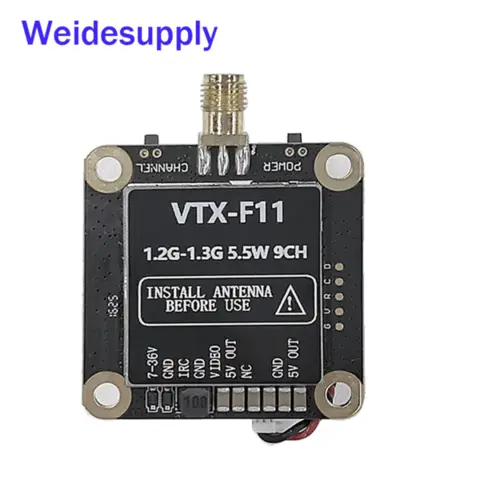
VTX-F11 Video Transmitter (VTX)
(1.2G~1.3G 9CH 5.5W)
The VTX-F11 is a compact, lightweight video transmitter featuring high output power (over 5.5W), low power consumption, low latency, and strong anti-interference capabilities. It incorporates an integrated aluminum heatsink with an active cooling fan to ensure stable power output during extended operation. Built-in thermal protection prevents overheating during prolonged ground configuration. Supporting the IRC protocol for OSD configuration, it is widely used in FPV drone flight, outdoor recreation, racing competitions, and professional aerial photography.
1. General Specifications
Parameter Specification Input Voltage DC 7V - 36V (2S - 8S LiPo) Output Voltage 5V ±0.5V (MAX 500mA when input voltage > 7.2V) Number of Channels 9 Channels (Programmable anywhere within 1080MHz - 1360MHz range; one frequency at a time) Transmit Power PIT Mode, 25mW, 800mW, 5500mW (5.5W) Control Protocol IRC Tramp (Supports OSD configuration) Modulation Type FM Frequency Control PLL (Phase-Locked Loop) Frequency Stability ±100KHz (Typical) Frequency Precision ±200KHz (Typical) Signal-to-Noise Ratio (S/N) @ Fo ±3 >70dBc Antenna Port Impedance 50 Ohms Antenna Connector SMA (Inner Pin) Video Standard PAL / NTSC Video Input Level Range 1V ±0.2Vp-p (Typical) Video Signal Format CVBS (Composite Video) Operating Temperature -10°C to +60°C Dimensions (L x W x H) 37mm x 37mm x 19mm (Excluding SMA connector) Mounting Hole Pattern 30.5mm x 30.5mm (M3 mounting holes) Weight 21.7g (Excluding antenna) ________________________________________
2. Interface Functions & Operation Guide
Physical Interfaces:
SMA: Antenna output (Inner Pin).
Fan Power: 5V fan supply connector.
Power Button: Short press cycles power levels (25mW / 800mW / 5.5W). Long press activates PIT mode.
Power LED (Green): Indicates power level: 1 blink (25mW), 2 blinks (800mW), 3 blinks (5.5W), Solid (PIT mode).
Channel LED (Blue): Blinks to indicate channel number (1-9 blinks).
Channel Button: Short press cycles through channels CH1 to CH9.
NC: No connection (Leave unconnected).
5V OUT: 5V ±0.5V regulated output (MAX 500mA when input > 7.2V).
Video IN: Video input (1Vp-p @ 75Ω).
GND: Video ground, power input negative, signal ground.
IRC: Remote serial control port (IRC protocol).
DC IN: Positive power input DC 7V - 36V (2S - 8S LiPo).
LED Indicator States:
Power (Green LED):
Solid: PIT Mode
1 Blink: 25mW
2 Blinks: 800mW
3 Blinks: 5500mW (5.5W)
Channel (Blue LED):
CH1: 1 Blink (1080 MHz)
CH2: 2 Blinks (1120 MHz)
CH3: 3 Blinks (1160 MHz)
CH4: 4 Blinks (1200 MHz)
CH5: 5 Blinks (1240 MHz)
CH6: 6 Blinks (1280 MHz)
CH7: 7 Blinks (1320 MHz)
CH8: 8 Blinks (1360 MHz)
CH9: 9 Blinks (1258 MHz)
Thermal Protection:
The VTX features thermal protection. If the temperature exceeds 100°C, the transmit power will automatically reduce by one level. If the temperature remains above 100°C, it will reduce by another level, continuing down to the minimum power level (25mW). When the temperature drops below 95°C, the power will return to the originally set level.
________________________________________
3. Remote OSD Configuration via IRC Protocol
Configure VTX power levels (25mW, 800mW, 5.5W) and frequency directly from your flight controller's OSD menu.
Hardware Connection:
Connect the VTX's IRC pin (serial RX) to an available TX pin on your flight controller's UART.
Ground Station Software Configuration:
Open the Ports tab in your configuration software (e.g., Betaflight).
Set the Peripherals dropdown menu for the connected UART to IRC Tramp (or similar, depending on your software).
________________________________________
4. Important Usage Notes & Warnings
ALWAYS connect the antenna BEFORE powering on the VTX. Using the VTX without an antenna, or with an antenna not matched to the 1.2-1.3GHz band, or improperly seated, can damage the power amplifier.
Select an appropriate operating frequency and ensure both the transmitter (VTX) and receiver (VRX) are set to the exact same channel/frequency (Refer to the channel table above).
CAUTION: High Temperature! The VTX housing will become very hot during normal operation, especially at higher power levels. Do not touch the case during or immediately after use to avoid burns. This heating is normal.
The outer case can be removed for weight saving. However, without the case, the VTX may run hotter, potentially leading to slightly reduced output power due to thermal throttling occurring sooner.
Strictly observe the input voltage range: DC 7V - 36V (2S - 8S LiPo). Do not exceed this range.
5V OUT Limitations: This output provides 5V ±0.5V at a maximum current of 500mA. Ensure your connected camera (or other device) operates within these limits. Do NOT connect devices drawing more than 500mA to the 5V OUT, as this will damage the VTX's internal voltage regulator.
WARNING: Never connect the 5V OUT pin to the DC IN power input or directly to the battery. This will cause severe damage to the VTX.
- VTX
- FPV
- Video Transmitter
- Drones
- Drone Parts
- Drone Component
- Drone
- UAV
- Electronic
- module
Capacidad de producción:
No informado
Plazo de entrega:
No informado
Incoterms:
CIF - Cost, Insurance and Freight
DDP - Delivered Duty Paid
EXW - Ex Works
FOB - Free on Board
Descripción de empaque:
No informado
Más sobre
Weide Technology Co,. Ltd

No informado

No informado

No informado
Año
Año de fundación
Tipo de negocio
- Distribuidor/Mayorista
Palabras clave
- 无人机模块
- 无人机配件
- 图传模块
- 高功率
- 多频段
- 抗干扰
- 专业
- 批发
- 零售
- 电子元器件 Ver Mais
Contacto y ubicación
-
 Jean ********
-
+86 1********
-
深圳 / 广东 | China
 Jean ********
 +86 1********
 深圳 / 广东 | China


